

Every time you buy or sell shares, Flattrade generates a Contract Note. Think of it as your official receipt for the day’s trading. It tells you what you bought or sold, at what price, and what charges were applied.
Many investors only look at the final amount, but understanding the contract note helps you verify your trades and know exactly where your money went.
What is a Contract Note?
A Contract Note cum Tax Invoice is an official document issued by Flattrade after your trades are executed.
It serves two purposes:
- Proof of your trades – It confirms what you bought or sold, the quantity, price, and trade time.
- Tax invoice – It shows all applicable charges such as STT, GST, stamp duty, and exchange transaction charges.
Unlike the instant trade confirmation you receive in the app or by SMS, the contract note is the final and legally valid record of your trades.
When will you receive it?
If you make at least one trade during the day, Flattrade generates a contract note for that trading day. You will receive it on T+1.
You can:
- Receive it on your registered email.
- Download it anytime from the Flattrade Wall flatform go to backoffice select Bills & Contracts then Contact you can do download form here.
Understanding each section
1. Header
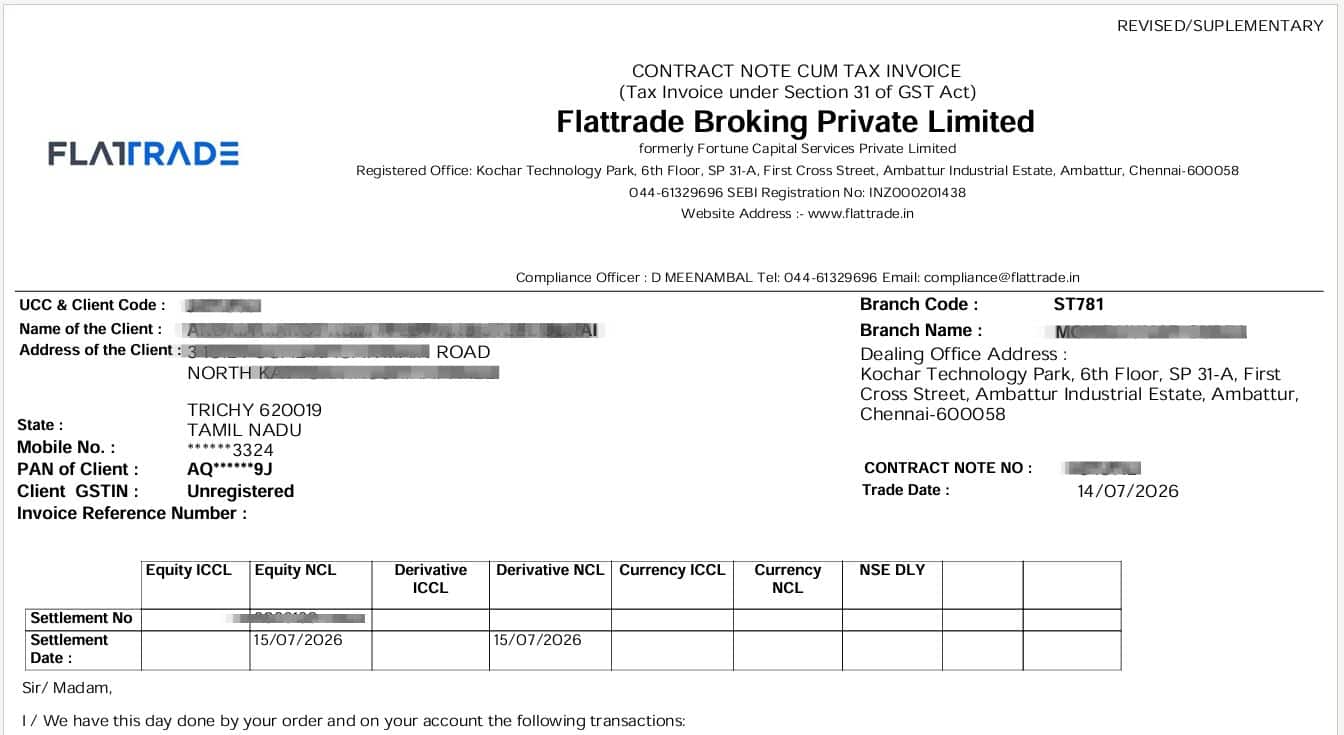
The first section contains basic information about both Flattrade and your account.
You’ll find details like:
- Your Client ID (UCC)
- PAN number
- Contract Note Number
- Trade Date
- Settlement Number
- Settlement Date
These details simply identify whose trades these are and which trading day they belong to.
2. Equity Segment
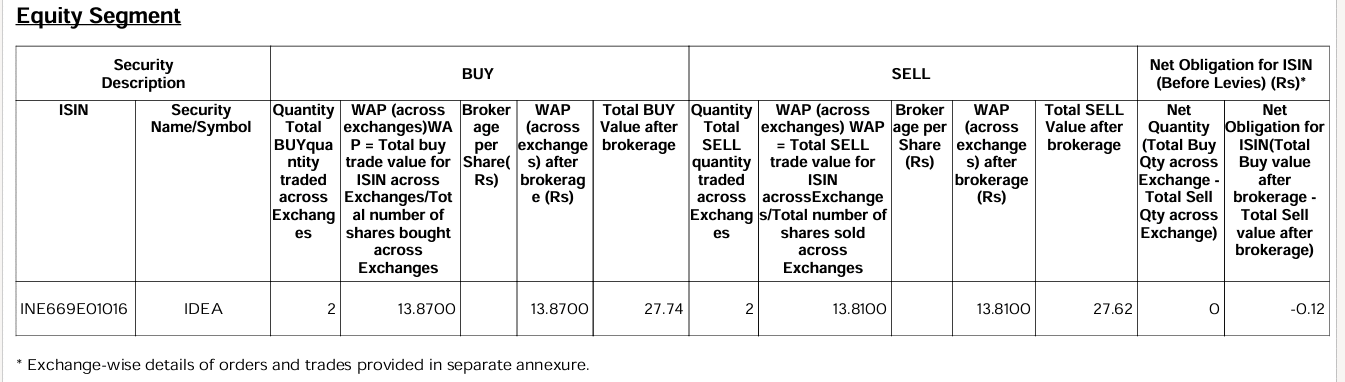
If you traded stocks, this section shows one row for each stock.
You’ll see:
- ISIN – A unique 12-character alphanumeric code used to identify a specific security
- Stock name – The name or symbol of the security that was bought or sold.
- Buy Section: Quantity bought
- Sell Section: Quantity sold
- Brokerage per share
- WAP (Weighted Average Price)
Instead of showing every order separately, Flattrade combines multiple trades in the same stock into one average price.
For example:
- Bought 10 shares at ₹100
- Bought another 10 shares at ₹110
Your WAP becomes ₹105.
- Total Buy Value After Brokerage = (WAP * Quantity of share bought) + Brokerage
Since Flattrade offers Zero Brokerage, the WAP After Brokerage remains the same as the WAP.
3. Derivative Segment (Only for Futures & Options)
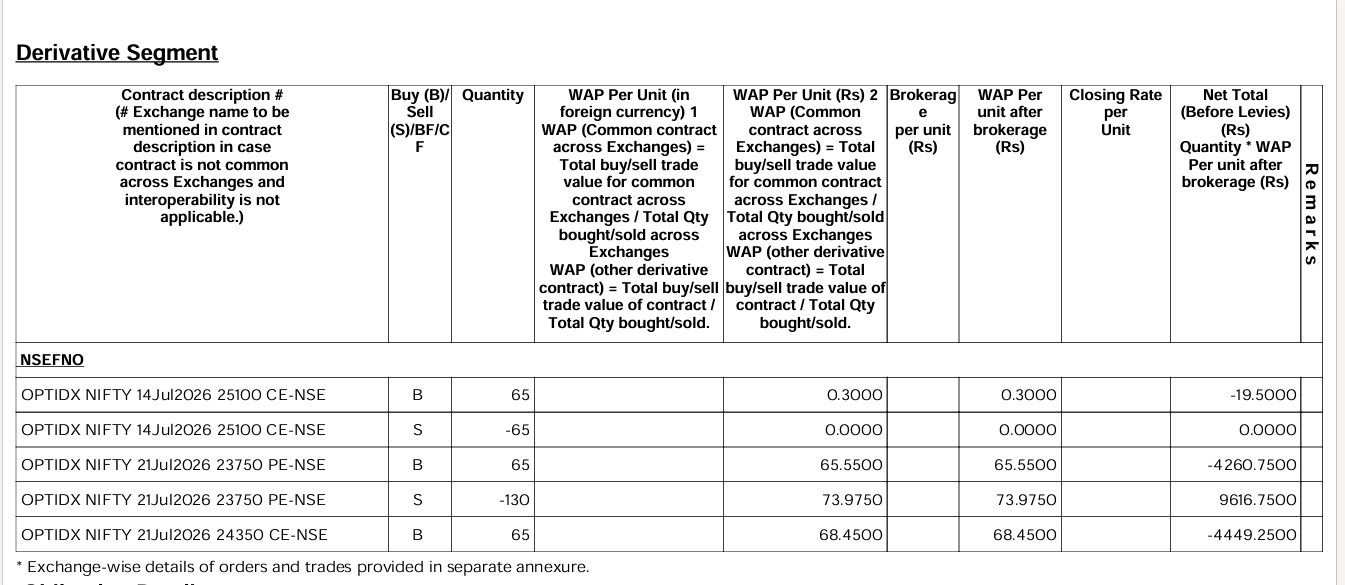
- This section appears only if you traded Futures or Options (F&O).
It includes details such as:
- Contract Description – OPTIDX → Index Option
NIFTY → Underlying Index
21Jul2026 → Expiry Date
23750 → Strike Price
PE → Put Option
NSE → National Stock Exchange - WAP – The Weighted Average Price (WAP) for common contracts across exchanges is calculated using the following formula:
WAP = (Total buy/sell trade value for common contract across exchanges) / (Total quantity bought/sold across exchanges) - For other derivative contracts, the WAP is calculated as:
WAP = (Total buy/sell trade value of contract) / (Total quantity bought/sold) - Brokerage per unit
- WAP Per unit after brokerage
- Closing Rate per Unit
- Net Total ( Before Levies)
Notes :
You may also notice remarks such as Auto Square Off if your position was closed automatically due to insufficient margin.
If you only invest in stocks, you may not see this section.
WAP for trades in the derivative segment
B (Buy): Indicates that you purchased shares, contracts, or securities.
S (Sell): Indicates that you sold shares, contracts, or securities.
BF (Brought Forward): Represents a position carried forward from the previous trading day.
CF (Carried Forward): Represents a position that remains open and is carried forward to the next trading day.
Where You’ll See Them: B and S are common in equity trading, while BF and CF are typically seen in Futures & Options (F&O) or other carry-forward positions.
CE (Call Option) – Indicates a Call contract,
PE (Put Option) – Indicates a Put contract.
4. Obligation Details
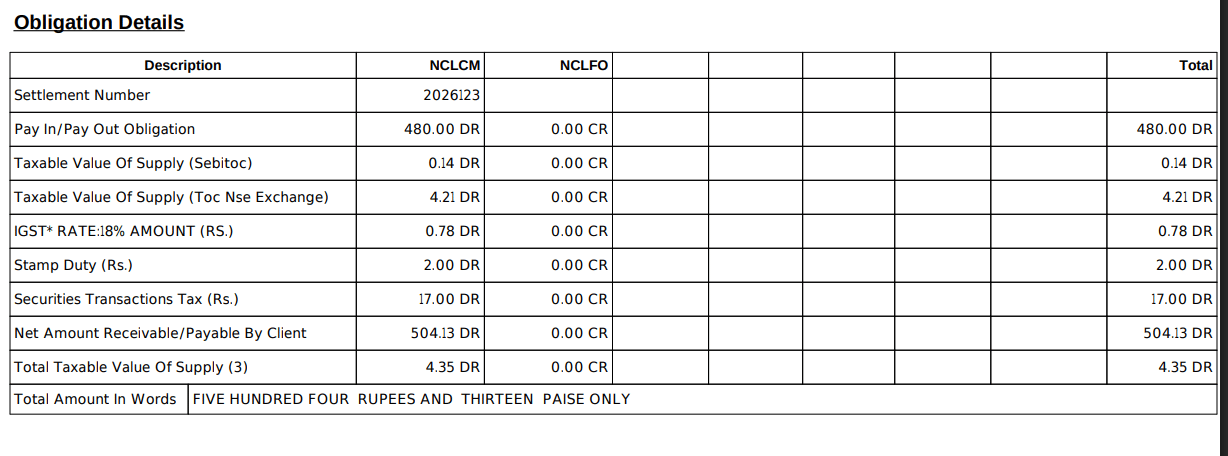
This is one of the most important sections because it explains how your final payable or receivable amount is calculated.
| Description | Meaning |
|---|---|
| Settlement Number | Unique number assigned to the settlement cycle by the exchange. |
| Pay In/Pay Out Obligation | Amount you need to pay (DR) or will receive (CR) after settlement. |
| Taxable Value of Supply (SEBI TOC) | Transaction charges collected by SEBI on your trades. |
| Taxable Value of Supply (TOC NSE Exchange) | Exchange transaction charges levied by NSE. |
| IGST @18% | GST charged on brokerage and applicable transaction charges. |
| Stamp Duty | Government stamp duty charged on the purchase side of trades. |
| Securities Transaction Tax (STT) | Tax levied by the Government of India on securities transactions. |
| Net Amount Receivable/Payable by Client | Final amount you must pay (DR) or receive (CR) after including all charges and taxes. |
| Total Taxable Value of Supply | Total value on which GST is calculated. |
| Total Amount in Words | The final payable/receivable amount written in words. |
- DR (Debit) = You need to pay.
- CR (Credit) = You will receive money.
- NCLCM = Amount related to the NSE Cash Market (Equity) segment.
- NCLFO = Amount related to the NSE Futures & Options (F&O) segment.
Finally, the contract note displays the Net Amount Payable or Receivable, which is the actual amount after adding or deducting all applicable charges.
5. Trade Annexure
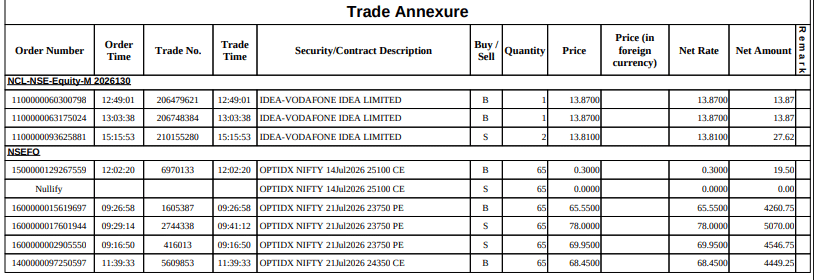
This section contains the complete details of every individual trade executed during the day.
| Column | Explanation |
|---|---|
| Order Number | Unique number assigned to the order when it is placed on the exchange. |
| Order Time | Time at which the order was placed. |
| Trade No. | Unique number assigned when the order is executed. |
| Trade Time | Time at which the trade was executed. |
| Security/Contract Description | Name of the security or derivative contract traded (e.g., stock, futures, or options). |
| Buy / Sell | Indicates whether the transaction is a Buy (B) or Sell (S). |
| Quantity | Number of shares or contracts traded. |
| Price | Execution price per share or contract. |
| Price (in foreign currency) | Price in foreign currency (applicable only for certain currency contracts; otherwise blank). |
| Net Rate | Effective price per share or contract after considering applicable adjustments. |
| Net Amount | Total value of the trade (Quantity × Net Rate). |
| Remark | Additional information about the trade, if applicable (e.g., Nullify, margin square-off, etc.). |
If you’ve placed multiple orders for the same stock, this section lets you verify each one separately.
Why should you check your Contract Note?
Even if you don’t trade frequently, it’s a good habit to review your contract note because it helps you:
- Confirm that all trades were executed correctly.
- Verify the prices at which your orders were executed.
- Understand the taxes and charges applied.
- Keep an official record for tax filing and future reference.
Reading your contract note only takes a few minutes, but it gives you complete clarity about every trade you make.