



In a dynamic market, traders need tools that help manage risk without slowing execution. One such tool is the Cover Order (CO) – an intraday order type designed to control downside risk through a mandatory stop-loss.
A Cover Order combines your entry order with a linked stop-loss order. You must define the stop-loss at the time of placing the trade. That built-in protection is what makes it a Cover Order.
What is a Cover Order?
A Cover Order is an intraday order with an in-built risk control feature. Your entry trade and stop-loss are placed together and linked.
When you place a CO, two orders are created:
- Primary Order– Buy or Sell (Market or Limit)
- Stop-Loss Order– Placed simultaneously to cap downside risk
Because the maximum risk is defined upfront, brokers and exchanges may allow lower margin requirements compared to regular intraday (MIS) orders.
Cover Orders can be used for both:
- Long positions (Buy CO)
- Short positions (Sell CO)
How Does a Cover Order Work?
When you place a Cover Order, the system links your entry order with a reverse stop-loss order.
Once the entry order is executed:
- The stop-loss becomes active
- It can be modified (within allowed limits)
- It cannot be cancelled independently
If neither the stop-loss nor a manual exit happens, the position is auto-squared off before market close.
Example
Buy Cover Order
Stock price: ₹500
Buy CO placed at ₹500
Stop-loss: ₹490
- If price rises → you can exit manually or trail stop-loss
- If price falls to ₹490 → stop-loss triggers automatically
Sell Cover Order
Stock price: ₹500
Sell CO placed at ₹500
Stop-loss: ₹510
- If price rises to ₹510 → stop-loss triggers and exits position
Cover Order vs Bracket Order
| Feature | Cover Order (CO) | Bracket Order (BO) |
| Parts | Entry + Stop-loss | Entry + Stop-loss + Target |
| Purpose | Limit downside risk | Limit downside + define target |
| Profit Booking | Manual | Automatic target order |
| Intraday Only | Yes | Yes |
| Auto Cancel Logic | Stop-loss linked | Target & SL linked |
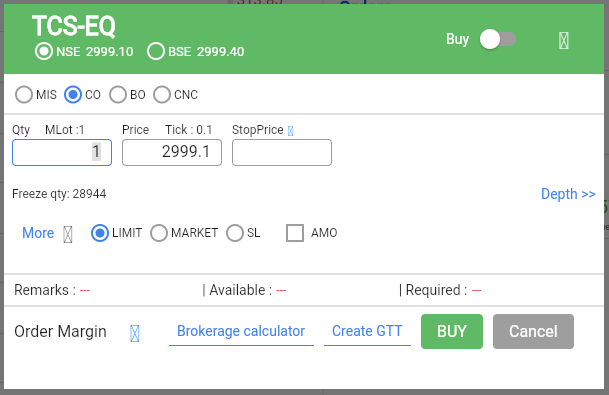
How to Place a Cover Order on Flattrade
- Log in to Flattrade App or Web
- Search for the stock
- Click Buy or Sell
- Select Cover Order (CO)as order type
- Enter quantity and price
- Enter the mandatory stop-loss price
- Review and submit
Once executed, the stop-loss is automatically linked.
Who Should Use Cover Orders?
Cover Orders are suitable for:
- Active intraday traders
- Risk-disciplined traders
- Beginners who want structured protection
- Traders looking to optimize margin usage
Important Things to Note
- Stop-loss cannot be removed after execution
- CO positions cannot be carried forward
- Orders are squared off before market close
- Stop-loss should consider market volatility
- After execution, only position exit is allowed -not order cancellation
A Cover Order is a practical intraday tool for traders who want discipline and risk control built into execution. By linking entry and stop-loss in one structure, it helps maintain protection even in fast-moving markets.
If your trading approach is risk-defined and intraday-focused, Cover Orders on Flattrade can support more structured execution.