

SEBI has mandated stock brokers through a circular to use the new format @valid UPI to help investors identify genuine payment handles used by stock brokers. The new system ensures that user payments are secured and transparent, guaranteeing funds reach their correct destination safely.
What are Validated UPI
Handles?
@valid UPI is a standardized and verified UPI format mandated by SEBI. The new format for the UPI handle is <Entity Name>.<Category tag>@Valid<Bank Identifier>
Every official UPI handle used by stock brokers will have a fixed format now :
Example: flattrade.brk@valididfc
This format makes it clear who the payment is going to and whether the UPI ID is legitimate.

Why did SEBI introduce the @valid format?
SEBI introduced the new UPI structure in order to:
1. Fraud prevention
In fact, earlier, fraudsters had used sham UPI IDs that resembled genuine broker handles, resulting in cases of diversion of investor funds.
2. Making it easier to identify UPI IDs
The standardized naming ensures investors instantly know they pay a registered broker.
3. Add a verification layer
Clients today can verify the UPI handle on a government check portal called SEBI Check.
Flattrade’s Official SEBI-Verified UPI Handles
Flattrade has fully implemented the SEBI-mandated @valid UPI format and, at present, uses three official handles for receiving client funds:
Always ensure you use only these handles while adding funds to your trading account.
Key Features of @valid Handles:
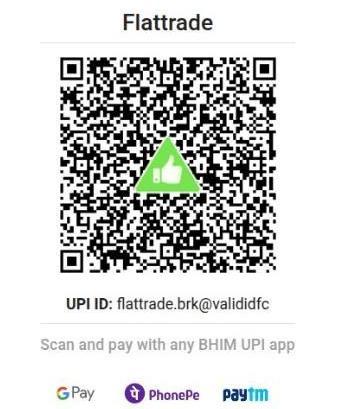
Visual Verification: A distinctive green triangle (as shown below) with a thumbs-up icon appears when making payments through these handles. If it doesn’t, it shows that the entity asking for payment is unauthorised.
Secure QR Codes: Specifically designed QR codes linked to @valid handles include the thumbs-up logo at the centre. It exemplifies that payments are being made to SEBI-registered intermediaries.
Example Image:
NOTE: Investors should verify the UPI ID before transferring funds: look for the “@valid” handle, check the category suffix, look for the thumbs-up icon, and optionally check via SEBI Check.
Click here to see how to use SEBI Check